On this page
I built eleven field tools for the questions homelab guides skip. Seven of them are arithmetic and decision trees — they run entirely in your browser and keep working with the network unplugged. The other four need a language model behind them, because “which line in this log is the actual cause” is not a calculation.
Those four had a flaw I’d been quietly living with: they didn’t work on my own website.
If you opened Log Triage on peira.dev, you got a polite notice explaining that this one thinks for a living and a link sending you to claude.ai. The tool was right there on the page, fully rendered, and completely inert. Four of my eleven tools were a brochure for themselves.
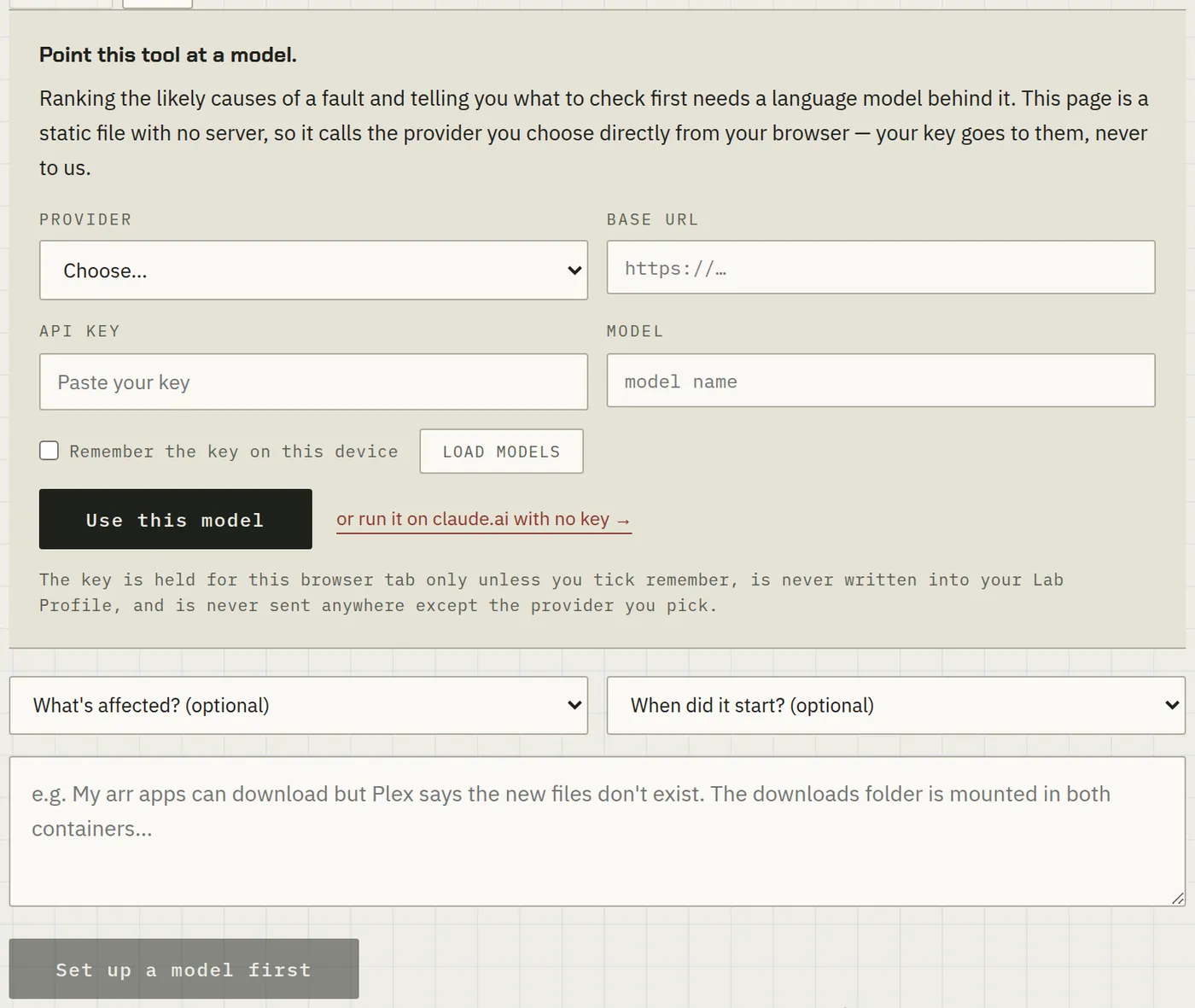
That’s fixed. They now ask you which model to use, and then talk to it directly from your browser.
Why they were stuck on claude.ai in the first place
Each tool is a single self-contained HTML file. No build step, no server, no bundle. That constraint is the whole point — you can save one to a USB stick and it still works — but it means there is nowhere to keep an API key. A key in the page source is a key you’ve published.
The original answer was to lean on window.claude.complete, an API that exists only inside a claude.ai artifact. It’s genuinely elegant: the reader’s own subscription pays for the inference, I pay nothing, and so the tools can stay free indefinitely without me quietly hoping nobody uses them. It’s also why I could publish tools that call a model at all without a funding model.
The catch is that the API exists only there. On any other page, window.claude is undefined, and the tool had nothing to fall back to.
The fix is the obvious one I’d been avoiding because it sounded like a security problem: let you bring your own key. It turns out the browser makes this safer than it sounds, for a reason worth explaining.
Your key does not pass through this site
There is no server here. peira.dev is static files on a CDN. When you paste a key into one of these tools, the page calls the provider directly from your browser — the request goes from your machine to OpenAI, or Anthropic, or your own Ollama, and never touches any infrastructure of mine.
This isn’t a promise about my good intentions; it’s a property of the architecture. I couldn’t log your key if I wanted to, because there’s nothing in the path that could log it.
What I can get wrong is where the key sits in your browser, so:
- It lives in
sessionStorageand dies when you close the tab, unless you explicitly tick remember on this device. - It is never written into your lab profile. That’s deliberate and load-bearing: the profile exists to be exported as JSON and rendered into a shareable lab record, so a credential in it would be handed out along with it.
- It goes to exactly one host — the provider you chose.
This applies to every browser tool that asks for one, not just mine. Use a key scoped to the smallest thing that works, and know where the revoke button is. If you point a tool at a custom endpoint, you’re sending your key to whoever runs that endpoint — which is inherent to the feature, and worth saying plainly rather than burying.
Which providers actually work from a browser
This part I tested rather than assumed, because “the API supports CORS” is a claim that ages badly and half the answers online are guesses. Every one of these was checked with a real cross-origin preflight from https://peira.dev on 14 August 2026:
| Provider | Preflight | What it returns |
|---|---|---|
| OpenAI | 200 | reflects the origin |
| Google Gemini | 200 | reflects the origin |
| DeepSeek | 200 | reflects the origin |
| Anthropic | 200 | * |
| Groq | 204 | * |
| OpenRouter | 204 | * |
All six work directly from a web page. Anthropic requires you to opt in with a header that is named, with admirable bluntness, anthropic-dangerous-direct-browser-access — the danger being exactly the one above: your key is in a browser, so treat it accordingly.
Anything else speaking the OpenAI chat API works too — LM Studio, llama.cpp’s server, vLLM, LiteLLM, Together, Fireworks. There’s a free-text base URL for that.
The interesting part: why your own Ollama can’t be reached from a website
Here’s the finding I didn’t expect, and the one most likely to save you an evening.
You cannot point peira.dev at your local Ollama. Not because I disallowed it — because the browser and Ollama each independently refuse, and either one alone would be enough.
Ollama refuses the origin. Out of the box it accepts requests from localhost and 127.0.0.1 origins and rejects everything else. A request carrying Origin: https://peira.dev gets a flat 403, before any question of models or keys arises.
Chrome refuses the address. Even with Ollama’s origins opened up, Private Network Access stops a public HTTPS page from reaching a private address unless the local server explicitly opts in by returning Access-Control-Allow-Private-Network: true. Ollama doesn’t send that header. Chrome has been enforcing this since v130.
It exists because the alternative is worse. Without it, any website you visit could quietly probe and poke every device on your home network — your router’s admin page, your NAS, your printer — using your browser as the way in. The rule that blocks my tool from reaching your Ollama is the same rule that stops a malicious page reaching your Proxmox host.
So the local path is: serve the tool yourself. Every tool in the repo is one file, and there’s a tiny loopback-only server included:
git clone https://github.com/peiralabs/field-tools.git
cd field-tools
python3 cors-server.py
Then open http://localhost:8643/log-triage.html and choose Ollama. No Ollama configuration is needed — it already allows localhost origins, which is now what your page has. Point it at http://localhost:11434/v1, or at another box on your LAN like http://10.0.0.50:11434/v1; what Ollama checks is the page’s origin, not the address you’re calling.
I ran exactly this against a CPU-only Ollama node running qwen2.5-coder:7b. Pasted a log with an ext4 error buried in six lines of noise, and it correctly pulled out the buffer I/O error as the line that mattered, told me which lines to ignore, and suggested smartctl. It took a while — CPU inference on old hardware is not fast — but it worked, entirely inside my own network.
Each provider gets a default model name in the panel, and model names go stale fast. Load models asks your provider what your key can actually see and fills the list from the answer. If you get a 404 mentioning the model name, that’s what to press.
One gotcha it now handles for you: if you run embedding models alongside chat models, nomic-embed-text often sorts first alphabetically — and it cannot answer a chat request. The panel skips embedding models when picking a default, because the first version didn’t, and the first thing it did was choose one.
What this changes
Mostly it means the tools are honest about what they are. Four of them claimed to be free browser tools while actually being adverts for a page on someone else’s site. Now they’re what they said they were.
It also means the tools survive me. If I lose interest, or Anthropic changes the artifact API, or peira.dev goes away — you have a file that runs against any model you like, on hardware you control, with no dependency on my continued attention. That was always the intent behind making them single files. This closes the last gap.
The seven offline tools are unchanged and still need nothing at all. All eleven are at peira.dev/tools, and the source, including the reasoning and the measurements above, is at github.com/peiralabs/field-tools.
Related posts:
- Eleven Free Homelab Tools for the Questions Guides Skip — what all eleven tools do, and the shared lab profile that connects them.
- Eleven Homelab Tools, One File Each — and the Bugs That Shipped Anyway — how they were built, and the mistakes that made this post necessary.
- Docker’s localhost Trap — the kind of silent networking failure the troubleshooter was built for.
- A Self-Healing Arr Stack — restart loops and wall-of-noise logs, which is Log Triage’s whole job.
- Common Homelab Storage Issues — the classics worth ruling out before you ask a model anything.
Comments
Comments are powered by GitHub Discussions — sign in with a GitHub account to join the conversation.