On this page
The eleven field tools are meant to feel like nothing. You open a page, you type, you get an answer. No signup, no cookie banner, no “create a free account to see your results”.
That flatness is the product. It’s also the part that took the longest, and this is the post about the underneath: the two constraints that shaped everything, and the three things that went wrong — one of which had already been live for a day before I noticed.
If you’d rather just see what they do, the tour is here. This one is the workshop floor.
First problem: they looked like everything else
The first draft was dark mode with neon accents and softly glowing cards. It looked competent. It also looked like every other tool page built in 2026, which is a problem when your whole pitch is “a person who runs a homelab made this on purpose”.
So I went and looked at what that sameness is actually made of, and it turns out to be a fairly short list of tells: dark backgrounds with glow, a coloured accent bar down one side of every card, small tracked-out capitals as a label above each heading, and the cream-and-terracotta palette that arrived everywhere at once. None of those are bad. They’re just fingerprints, and once you’ve noticed them you can’t stop noticing them.
Three iterations later the tools look like a printed field manual: putty-coloured paper, a faint drafting-blue grid, hairline rules instead of soft shadows, diagonal hatching where something is dead or dangerous, one desaturated ink per tool, and motion only when a value actually changes — nothing drifting or breathing in the background.
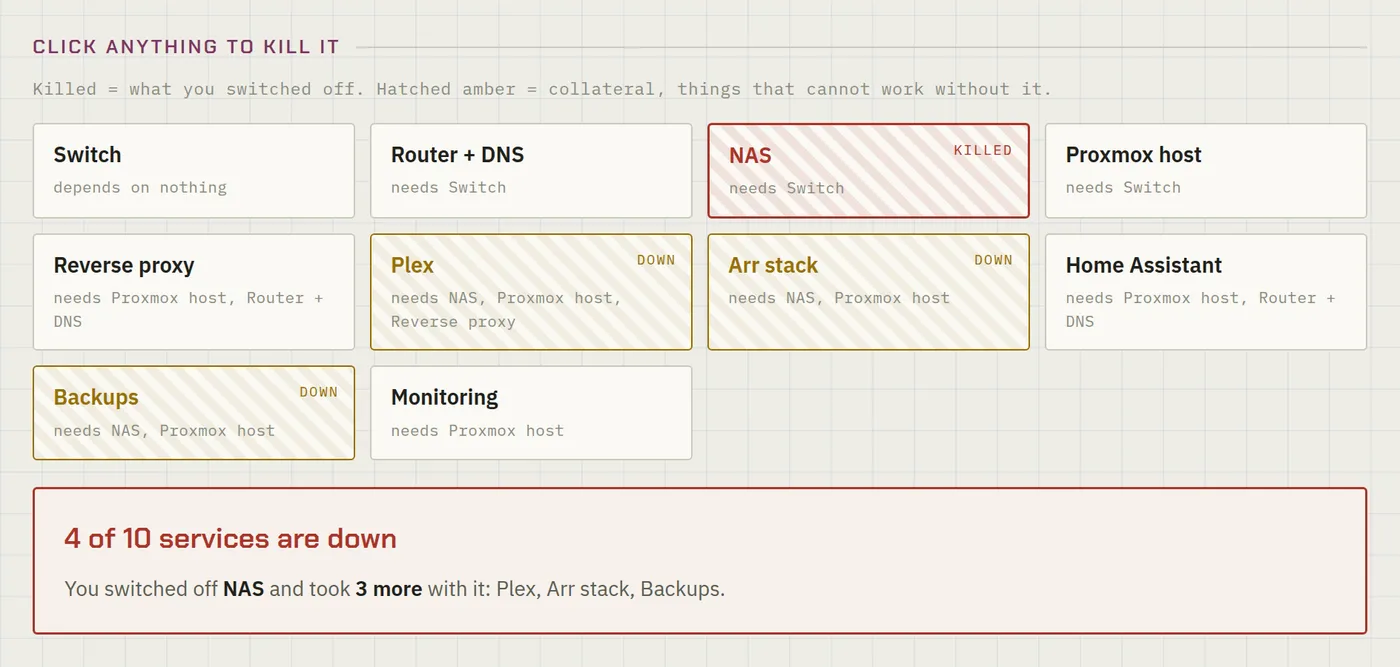
You may think the result is worse than the neon version — that’s genuinely a matter of taste. The point is that it’s a decision rather than a default.
Second problem: it all has to fit in one file
Every tool is published twice: served from peira.dev, and also as a public, forkable claude.ai artifact so you can open it, change the numbers, rewrite the prompt and make it yours.
That second destination sets the hardest constraint in the project. An artifact can’t reference an external script or stylesheet. No <script src>, no shared CSS file, no bundler. Whatever a tool needs has to be inside the one file.
Which is fine for one tool and absurd for eleven, because they share a lot: the shared lab profile, the AI plumbing, the whole design system. Copy-paste across eleven files means eleven divergent copies within a fortnight.
The compromise: the shared code lives once, and a small script stamps it into every tool between marker comments.
The rule that follows is unforgiving and I’ve broken it once already: never edit the copy inside a tool. It works perfectly right up until somebody runs the injector, at which point your change quietly disappears. A checker now refuses to publish if any tool is carrying a stale copy.
Third problem: a character I couldn’t see
This is my favourite thing that has ever gone wrong on this site.
The AI tools render the model’s reply as Markdown. My renderer needed a marker it could drop into the text and reliably find again later, and for that marker I used a raw control character — one of the invisible bytes below the printable range. Sensible enough on the face of it: no reader is ever going to type one, so it can’t collide with real content.
It passed every test locally. Then I copied the file into the publishing step — and the copy that came out the other side wouldn’t run at all.
Clipboards are allowed to normalise what passes through them, and this one quietly dropped the control character. My regular expression went from “match this sentinel” to “match nothing” — an empty regex is a syntax error, the script failed to parse, and every feature in the tool would have died at once, not just the Markdown.
I got lucky on the timing: the break happened during publishing rather than after it, so the verification step caught it before any reader did. Luck is the right word. Nothing in my process was looking for it.
What makes it a good story is that it was invisible at every point where I might have caught it deliberately. It didn’t show up in a diff. It didn’t show up in review. It only appeared as absence, in a file that had travelled.
Write \x01, never the raw byte. Anything that travels through a clipboard, a form field, a chat message or a copy-paste in someone’s terminal can be silently normalised on the way. If a character matters to your logic and you can’t see it, spell it out. My checker now refuses to publish a file containing raw control characters at all.
Fourth problem: I reviewed the tools after shipping them
Once all eleven existed I did a deliberate adversarial pass — read every tool looking for what’s wrong rather than admiring what works. It found eleven real defects, three of them in tools that had already been live for a day.
The one that stung most: in the failure simulator, renaming a node onto a name another node already had silently merged the two into one bucket. The tool didn’t error. It produced a confident, meaningless failover result. Nearby, names people typed were being dropped into the page without escaping, and a six-column table shoved the entire layout 137 px sideways on a 375 px-wide phone.
But the findings that actually changed how I work were the ones in the prompts.
Two of my AI tools were stating things that weren’t true. One told readers that docker compose down -v would leave their named volumes alone. It deletes them — that’s precisely the command that eats a database. Another recommended a Compose setting as a security control when it’s documentation-only metadata, which would leave someone believing a port was closed when it was wide open. A third suggested a UPS configuration directive that simply doesn’t exist in that file’s vocabulary, so the snippet would have been pasted and quietly done nothing.
This is the thing I’d most want another builder to take away. A blog post has a byline, a date, and somewhere to leave a correction. A tool has none of that — it just asserts, in a confident box, to somebody who is already mid-problem and inclined to believe it. I now source the sentences inside a prompt to the same standard as the sentences in a post, and when a post repeats a claim a tool makes, I re-check it rather than trusting my own earlier self.
I’ll admit the uncomfortable part: I only found these because I went looking after publishing. The review should have been the last step before, not the first step after.
And then nobody could find them
The last one is almost funny. Eleven tools, live, fast, indexable — and from the moment the section launched, not one of them was in the sitemap.
The tools are static files copied straight into the site’s public/ directory. The sitemap generator enumerates framework routes, and anything served verbatim out of public/ is invisible to it. So the sitemap listed the /tools/ index page and nothing beneath it. Search engines could only reach the individual tools by crawling links from that one page.
I found it while assembling a list of URLs to submit for indexing — which is to say, by accident, doing something else.
The fix was small: feed the sitemap a list built by scanning the tools directory at build time, rather than a hardcoded list that would rot the moment I added a twelfth tool. The sitemap went from 157 URLs to 168.
The tools were fine the whole time. Every test I’d run was a test of the tool. Nothing I’d run asked the separate question of whether the outside world could find it. Any time you serve something from outside your framework’s normal routing — a static directory, a redirect, a proxied path — assume the surrounding machinery doesn’t know it exists until you’ve checked.
What I’d do differently
Three things, honestly:
Review before publishing, not after. The adversarial pass was the highest-value hour of the whole project and I ran it in the wrong order.
Treat prompt text as published text from the start. It took me until the second wrong Docker fact to internalise that a sentence inside a tool is more dangerous than the same sentence in a post, not less.
Test the file that travelled, not the file on my disk. The invisible character is a specific instance of a general failure: I kept verifying the thing I had, rather than the thing the reader would get. That’s also what caused a later mistake — four of these tools spent their first days unable to run on my own site, which is its own story.
The tools are all at peira.dev/tools, free, no signup. The whole source — including the checker, the injector and the notes above — is public at github.com/peiralabs/field-tools, MIT licensed. If you find a twelfth bug, I’d genuinely like to know.
Related posts:
- Eleven Free Homelab Tools for the Questions Guides Skip — what the tools actually do, and the shared lab profile that connects them.
- Point the Homelab Tools at Any Model — the sequel to the last mistake in this post, and why a website can’t reach your local Ollama.
- Docker’s localhost Trap — another failure that is invisible until you know the shape of it.
- A Self-Healing Arr Stack — the restart-loop logs that Log Triage was built to read.
- Common Homelab Storage Issues — the classics worth ruling out before you reach for a tool.
Comments
Comments are powered by GitHub Discussions — sign in with a GitHub account to join the conversation.